

LinkedIn has become the first stop for recruiters when searching for candidates. In fact, 87% of recruiters use LinkedIn regularly to find and vet talent (Jobvite). For job seekers, that means your ability to connect with recruiters directly on the platform can make or break your chances of landing interviews.
But here’s the challenge: most LinkedIn users either send a generic connection request or spam recruiters with their resume. That doesn’t build relationships - and it rarely gets replies.
The good news? Networking on LinkedIn isn’t about sending hundreds of messages. It’s about building genuine connections, using the right LinkedIn profile setup, and crafting messages that recruiters actually want to read. With the right approach, you can move from being just another LinkedIn member to becoming a valuable connection recruiters remember when opportunities open up.
In this guide, we’ll cover:
✅ How to optimize your LinkedIn profile so recruiters actually want to connect with you ✅ The best practices for sending connection requests that get accepted ✅ Proven LinkedIn message templates you can customize for recruiters ✅ How to use LinkedIn groups, events, and even video resumes to stand out ✅ Strategies for turning a connection into an interview
By the end, you’ll know exactly how to network on LinkedIn with recruiters - and how to use those relationships to land more interviews and job offers.
1. Understanding the Importance of Networking on LinkedIn
When it comes to job searching, networking has always been one of the most effective ways to land opportunities. But in 2025, much of that networking happens online - and LinkedIn is the #1 professional network recruiters use.
So, why does LinkedIn networking matter so much?
Direct access to recruiters and hiring managers → Instead of applying blindly through job boards, you can connect directly with the people making hiring decisions. Visibility in a competitive job market → A strong LinkedIn network increases your chances of being found through search. The more meaningful connections you have, the higher your profile appears in recruiter searches.
Professional networking at scale → Unlike traditional networking, where you rely on small events or introductions, LinkedIn allows you to build a professional network of 1st, 2nd, and 3rd degree connections across industries and geographies. Relationship building → Recruiters don’t just want applicants; they want relationships. By connecting before a role opens, you position yourself as a genuine connection, not just another resume in their inbox.
Example: Imagine a recruiter at your dream company posts a new opening. If you’re already connected and have engaged with their posts, you’re far more likely to get noticed when you apply - because they’ve already seen your name and profile pop up before.
👉 Key takeaway: Networking on LinkedIn isn’t just about landing one job - it’s about building long-term professional connections that keep opening doors throughout your career.
2. Creating a Professional LinkedIn Profile
Before you start sending out connection requests, make sure your LinkedIn profile is recruiter-ready. Think of it as your digital first impression - if it’s incomplete, generic, or outdated, even the best networking efforts will fall flat.
Here’s how to optimize your profile for LinkedIn networking:
Profile Photo & Headline
Your profile photo should be clear, professional, and approachable — not a blurry crop from a holiday picture. Pair it with a headline that does more than just list your job title. For example:
❌ “Customer Service Representative”
✅ “Customer Service Representative | Helping companies improve client satisfaction through clear communication & problem-solving”
Compelling Summary
Your LinkedIn summary is where you show personality and motivation. Write in the first person, highlight your top skills, and make sure to include relevant keywords from your industry. A recruiter scanning profiles should instantly understand what you do and why you’d be a valuable connection.
Experience & Achievements
List your work experience just like you would on a resume - but keep it concise and achievement-driven. Use short paragraphs or bullet points that highlight measurable results (e.g., “Improved customer satisfaction score by 25% in 12 months”).
Skills, Endorsements & Recommendations
Add at least 10-15 relevant skills to your profile (e.g., customer service skills, digital marketing, project management). Encourage colleagues to endorse you, and request recommendations from past managers or teammates to build trust.
📌 Pro tip: A strong LinkedIn profile doesn’t just help recruiters find you - it also makes your connection requests more credible. If someone checks your profile after you reach out, they should instantly see why you’re worth connecting with.
Want more detail? Check out our guide on creating a compelling LinkedIn profile.
3. How to Find Recruiters to Network With on LinkedIn
Before you can send a connection request, you need to know who to reach out to. LinkedIn makes it surprisingly easy to identify recruiters and talent acquisition specialists who are actively hiring.
Here’s how to find them:
Use job postings as a starting point. Many job ads list the recruiter or HR manager. Check the “Posted by” section on LinkedIn job posts.
Search by job title. Type in “Recruiter,” “Talent Acquisition Specialist,” or “Hiring Manager” + your industry/target company in the LinkedIn search bar.
Filter by company. If you’re targeting a specific employer, go to their company page and filter employees by role to find the recruiter responsible for hiring.
Look at mutual connections. If someone in your network has worked with a recruiter you’d like to approach, that’s your opening for a warm introduction.
Join LinkedIn groups. Some recruiters actively post in LinkedIn groups related to job seekers, specific industries, or alumni networks.
👉 Pro tip: Not every recruiter is equal. Prioritize those who recruit in your industry or for the types of roles you’re pursuing. For example, if you’re applying to tech sales, search for “Tech Sales Recruiter” or “SaaS Recruiter.”
4. Best Practices for Sending Connection Requests and Messages (With Examples and Templates)
Reaching out to recruiters on LinkedIn is a skill in itself. A weak or generic connection request can be ignored, but a thoughtful, structured message can open the door to an interview.
Here’s how to get it right:
Personalize Every Connection Request
Reference the role or company. Recruiters want to know you’re intentional.
Highlight shared interests or mutual connections. This makes your outreach warmer.
Keep it short. Aim for 2–3 sentences in your connection request.
Example: “Hi [Recruiter’s Name], I noticed you’re hiring for [Job Title] at [Company]. I’d love to connect and share more about how my background in [Relevant Skills] aligns with the role.”
Follow the Right Message Structure
Once connected, your first message should follow this simple framework: Intro + Value + Call to Action
Intro: Who you are (profession, experience level).
Value: Why you’re reaching out (your skills, achievements, motivation).
CTA: Offer to send your resume or share next steps
Message Templates for Recruiters
Here are proven templates you can adapt to your own outreach:
Template 1 | Generic Request Hi [Recruiter’s Name], I saw you’re hiring for the [Job Title] role at [Company]. I’m excited about the opportunity and believe my background with [Skill/Experience] is a great fit. I’d love to connect and share my CV with you.
Template 2 | Sending a Video Resume Hi [Recruiter’s Name], I noticed that [Company] is currently hiring for [Job Title]. I’m a [Your Profession] with [X years] of experience in [Relevant Skills/Industry] and I’m exploring new opportunities in [Specific Field]. I’ve recorded a quick 30-second video introducing myself and explaining why I’d be a good fit. Here’s the link: [Insert Video Resume Link].
Template 3 | Mutual Connection Hi [Recruiter’s Name], I noticed we’re both connected with [Name]. [They] often speak highly of [Company], and I’m particularly interested in your work in [Specific Area]. With my background in [Relevant Field] and passion for [Relevant Interest], I’d love to connect and send over my CV to see if I might be a good fit for upcoming opportunities.
Template 4 | InMail Message Hi [Recruiter’s Name], I’m reaching out following the job posting for [Role] at [Company]. I’m a [Your Profession] with [X years] of experience in [Relevant Skills]. I admire [Insert Specific Motivation for Company] and would love to connect with you to discuss my qualifications further. I’d be happy to send over my CV and, if helpful, a short video introduction as well.
Example:
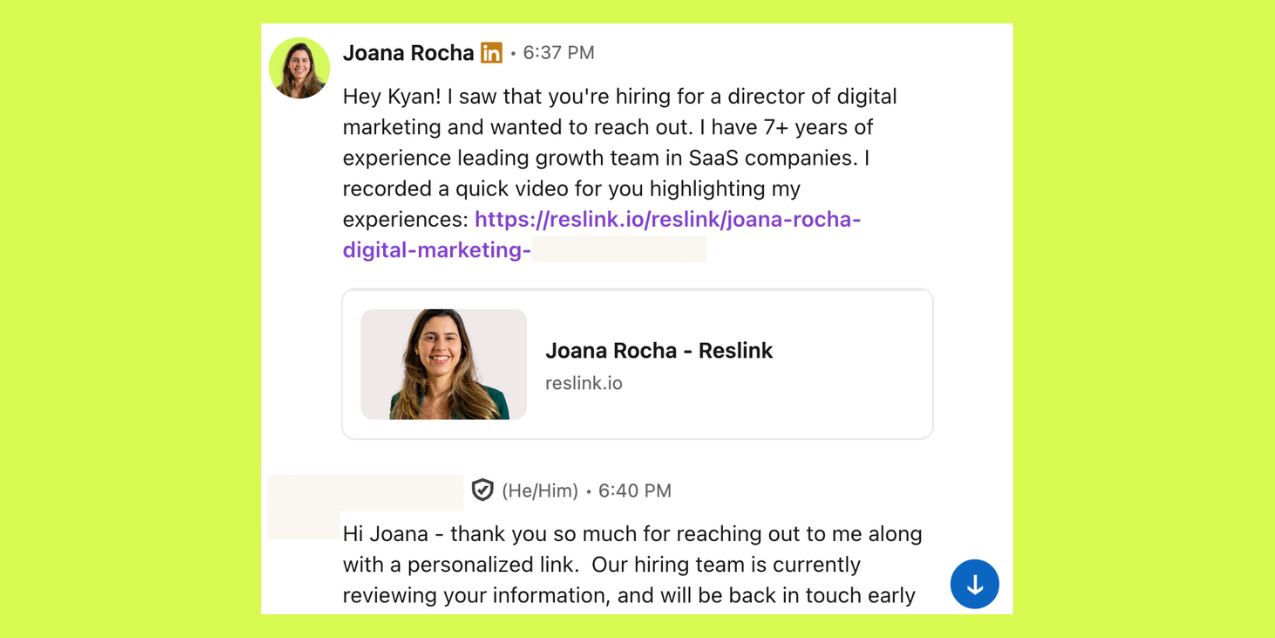
Why Video Makes You Stand Out
Most recruiters skim text messages in seconds. A video resume link makes you instantly more memorable - they can see your communication skills, confidence, and enthusiasm for the role. In a competitive market, that can be the difference between being ignored or getting invited to interview.
One powerful way is to send a video resume link using Reslink. A 60–90 second video pitch demonstrates your communication skills, enthusiasm, and confidence in a way text never can. For recruiters scanning dozens of connection requests daily, a video instantly makes you more memorable.
👉 Bottom line: Treat LinkedIn outreach like a first impression. Keep it professional, personalize your approach, and whenever possible, show recruiters who you are - not just what’s on paper.
5. Leveraging LinkedIn for Job Search and Career Advancement
Networking on LinkedIn isn’t just about making connections — it’s about turning those connections into real career opportunities. Once your LinkedIn network includes recruiters, hiring managers, and industry professionals, the next step is to use LinkedIn’s features strategically to land interviews and grow your career.
Use LinkedIn’s Job Search Features
LinkedIn isn’t just a social media site - it’s one of the largest job boards in the world. Use filters like location, experience level, and job title to find the right roles. You can also set up job alerts to stay ahead of other job seekers.
Endorsements and Recommendations
Recruiters don’t just look at your LinkedIn profile summary or work experience. They also check endorsements and recommendations to validate your skills. Asking colleagues or past managers for a quick endorsement can boost your credibility.
Showcase Skills Beyond Your Resume
Post engaging content about your industry, share insights, or comment thoughtfully on other people’s posts. This positions you as an active, knowledgeable LinkedIn member - which makes recruiters more likely to notice you when you apply.
Track and Measure Your Networking Efforts
LinkedIn Premium and Sales Navigator (for advanced users) give you tools to see who’s viewed your profile and how well your outreach is working. Even without paid tools, monitoring your LinkedIn connections growth and recruiter responses is key to improving over time.
👉 Bottom line: Treat LinkedIn as more than a job board. It’s a professional networking platform where meaningful connections, endorsements, and consistent engagement can open doors to your next role.
6. Key Takeaway: Turning LinkedIn Networking into Interviews
Networking on LinkedIn isn’t about sending out hundreds of random connection requests - it’s about building genuine connections that lead to real opportunities. Recruiters get flooded with LinkedIn messages every day, so the goal is to make yours personal, concise, and memorable.
Here are the key takeaways:
➡️ Optimize your LinkedIn profile so recruiters instantly understand who you are and what you bring to the table.
➡️ Personalize every connection request - reference the role, highlight your fit, and keep it clear.
➡️ Follow up thoughtfully by offering your resume, video resume, or a quick call to share more.
➡️ Stand out with a Reslink video resume - adding a 60–90 second video link gives recruiters a chance to see your communication skills, confidence, and personality, which can’t come across in text alone.
👉 Bottom line: The job market is competitive, but when you combine smart LinkedIn networking with tools like Reslink, you create a connection strategy that doesn’t just get you noticed - it gets you interviews.
7. FAQ (Frequently Asked Questions)
1. How do I network with recruiters on LinkedIn?
Start by optimizing your LinkedIn profile so it looks professional and recruiter-ready. Then, send personalized connection requests that reference the job title or company you’re interested in. Once connected, follow up with a short, polite message offering your resume or even a Reslink video resume to stand out.
2. Should I message recruiters even if they don’t have a job posted?
Yes. Building genuine connections before roles are open is one of the smartest LinkedIn networking strategies. A recruiter may keep you in mind for future opportunities, especially if you show interest in their company and bring relevant skills.
3. What’s the best way to send a LinkedIn connection request to a recruiter?
Keep it short and personal. Mention the role or company, explain why you’re a good fit, and invite them to connect. A great structure is: intro + relevant experience + call to action. Adding a Reslink video link can make your message far more memorable.
4. Is it better to use LinkedIn InMail or connection requests?
If you have LinkedIn Premium, an InMail message lets you reach recruiters without being connected first. But a personalized connection request is usually just as effective - especially if you follow up with a tailored message.
5. How can I find recruiters to connect with on LinkedIn?
Search by job title (e.g., “recruiter” or “talent acquisition”) + company name in the LinkedIn search bar. You can also use filters like location, industry, or 2nd degree connections. Joining relevant LinkedIn groups is another way to find recruiters in your field.
6. How often should I follow up with a recruiter on LinkedIn?
If they don’t respond to your first message, wait about a week before following up. Keep it polite and respectful - for example, “Just wanted to follow up in case my last message got buried.” Don’t spam multiple messages in a row.
7. Do recruiters really watch video resumes?
Yes - especially if they’re short (60–90 seconds) and relevant. A video resume can cut through the noise and help you build a personal connection that’s hard to create through text alone. Recruiters want to see communication skills, enthusiasm, and confidence - all things that shine in video.